
Introduction
Artificial Intelligence has rapidly evolved with Large Language Models (LLMs) like GPT-style systems, capable of generating human-like responses. However, these models have a limitation: they rely only on the data they were trained on, which can become outdated or incomplete.
This is where Retrieval-Augmented Generation (RAG) comes in. RAG enhances LLMs by allowing them to retrieve real, up-to-date information from external sources before generating an answer.
In simple terms:
RAG = Search + Understand + Generate
🧠 What is RAG?
Retrieval-Augmented Generation (RAG) is an AI architecture that combines:
- Retrieval system → fetches relevant information from external knowledge sources
- Language model (LLM) → generates a natural language response using that information
Instead of relying purely on memory (training data), the model “looks things up” before answering.
This significantly improves:
- Accuracy
- Freshness of information
- Domain-specific responses
- Trustworthiness (because sources can be cited)
Why Do We Need RAG?
Traditional LLMs suffer from:
1. Hallucinations
They sometimes generate incorrect or made-up information.
2. Static Knowledge
They don’t know events or updates after their training cutoff.
3. Limited Domain Knowledge
They struggle with private or company-specific data.
RAG solves these problems by giving the model access to external knowledge at runtime.
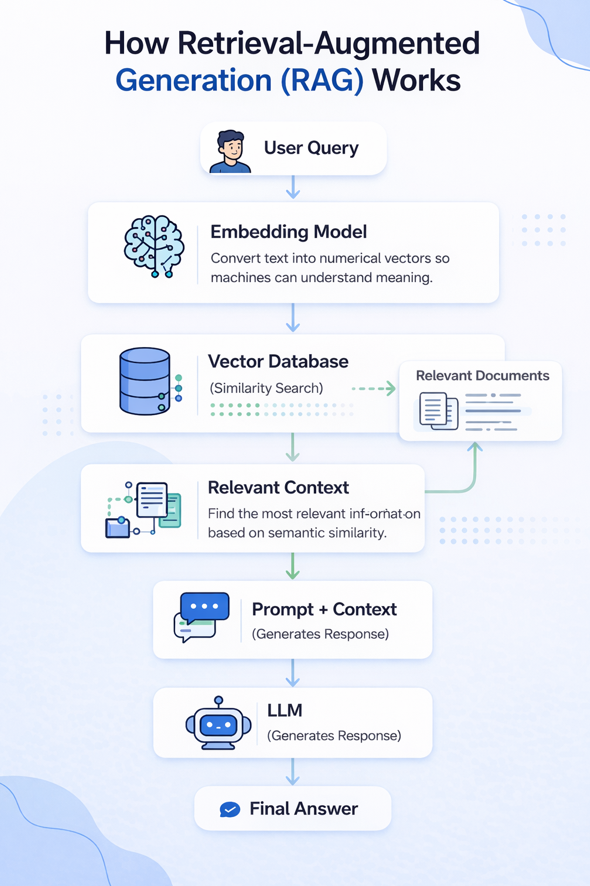
🔄 RAG Architecture (Visual Diagram)
Here’s a simple flow of how RAG works:
🧩Step-by-Step Workflow of RAG
Step 1: User asks a question
Example:
“What are the benefits of solar energy?”
Step 2: Query is converted into embeddings
The system transforms the question into a numerical vector.
Step 3: Retrieval from knowledge base
The system searches a vector database and retrieves relevant documents.
Example retrieved chunks:
- Article on renewable energy
- Government report on solar power
Step 4: Context is added to prompt
The retrieved text is combined with the user’s query.
Step 5: LLM generates response
The model uses both:
- User question
- Retrieved knowledge
to generate a grounded answer.
Step 6: Final answer is returned
The response is more accurate and factual.
⚙️ Key Components of RAG
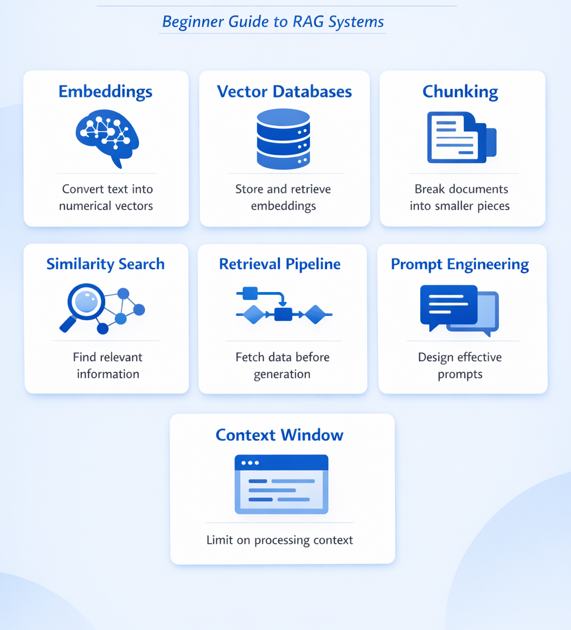
To build a strong understanding of RAG systems, developers should be familiar with the following concepts:
1. Embeddings
Embeddings convert text into numerical vectors that represent meaning. This allows machines to understand semantic similarity between pieces of text.
2. Vector Databases
Vector databases store embeddings and allow efficient similarity searches. Popular tools include Pinecone, Weaviate, and FAISS.
3. Chunking
Large documents are broken into smaller chunks. This improves retrieval accuracy and ensures relevant information is selected.
4. Similarity Search
Instead of keyword matching, similarity search finds content based on meaning. This is a core part of how RAG retrieves relevant data.
5. Retrieval Pipeline
The retrieval pipeline is responsible for fetching relevant information before generation. It connects the query to the right data source.
6. Prompt Engineering
The quality of output depends heavily on how the prompt is structured. Well-designed prompts lead to more accurate and useful responses.
7. Context Window
LLMs have a limit on how much information they can process at once. Managing the context window is important to ensure relevant data is included without exceeding limits.
🚀Benefits of RAG
RAG offers several advantages:
- ✅ More accurate responses
- ✅ Up-to-date information. Uses real-time or frequently updated knowledge resources
- ✅ Reduced hallucinations. Answers are grounded in retrieved data
- ✅ Better domain-specific knowledge.
- ✅ No need to retrain models. You can update knowledge by simply updating documents
🎯When Should You Use RAG?
RAG is particularly useful when:
- You need real-time or updated information
- Your data is too large to fine-tune a model
- You want explainable AI with traceable sources
Real-World Use Cases
1. Chatbots
Customer support assistants using company FAQs.
2. Enterprise search
Searching internal company documents.
3. Legal & compliance tools
Retrieving legal clauses and regulations.
4. Medical assistants
Pulling research papers and clinical guidelines.
📊RAG vs Traditional LLMs
| Feature | Traditional LLM | RAG System |
|---|---|---|
| Knowledge freshness | Fixed | Dynamic |
| Accuracy | Medium | High |
| Hallucination risk | Higher | Lower |
| Data source | Training only | External + training |
| Updates | Requires retraining | Just update documents |
🏁 Conclusion
RAG is transforming how AI systems are built by combining retrieval and generation techniques.
Understanding concepts like embeddings, vector databases, and retrieval pipelines is essential for developers building modern AI applications.
As AI evolves, RAG will become a core architecture pattern for intelligent systems.